The product, in detail
What Verivius actually does
Verivius is a governance workspace for CQC-regulated providers.
It is not your electronic patient record, clinical system, HR system or policy library. It sits above day-to-day care and treatment and gives the registered manager one place to see what governance work is due, what is overdue, what evidence has been attached, what has changed, and what still needs escalation.
Verivius is live, and any CQC-regulated provider can start a trial. This page uses the Verivius demo workspace to show the operating model: what the service sees on a normal Tuesday, how records link together, and what an inspector can follow when they sample the evidence trail.
Written by Klaudiusz, the founder of Verivius and a former CQC inspector.
About fifteen minutes to read. If you would rather talk it through, the 30-minute call is the faster path.
Prefer a shorter overview first? Start with Verivius as CQC compliance software, then come back here for the detail.
1. The shape of the product
Verivius is organised as one workspace per service.
The workspace is built around the recurring rhythm of a regulated provider: incidents, complaints, safeguarding concerns, risks, safety alerts, statutory notifications, governance meetings, staff supervision, training evidence, assurance checks and readiness reviews.
The dashboard answers the manager's first question: what needs attention now?
The registers answer the second question: what has happened, what is still open, and what evidence exists?
The audit trail answers the inspection question: who changed what, when, and what did the service do as a result?
The left-hand navigation keeps the main work surfaces visible. There is no separate module catalogue and no deep maze of menus. The point is not to make governance feel bigger. The point is to make it easier to run, evidence and review.
Verivius does not store detailed clinical records and does not replace clinical judgement. It records the governance trail around practice: what was reported, what was reviewed, what actions were assigned, what evidence was attached, what risks changed, and what was reviewed through governance.
2. The four-zone dashboard
The dashboard is organised into four zones, each answering a different question. The four zones are deliberate, not a grid of widgets. They reflect how a registered manager actually triages their day.
Transcript
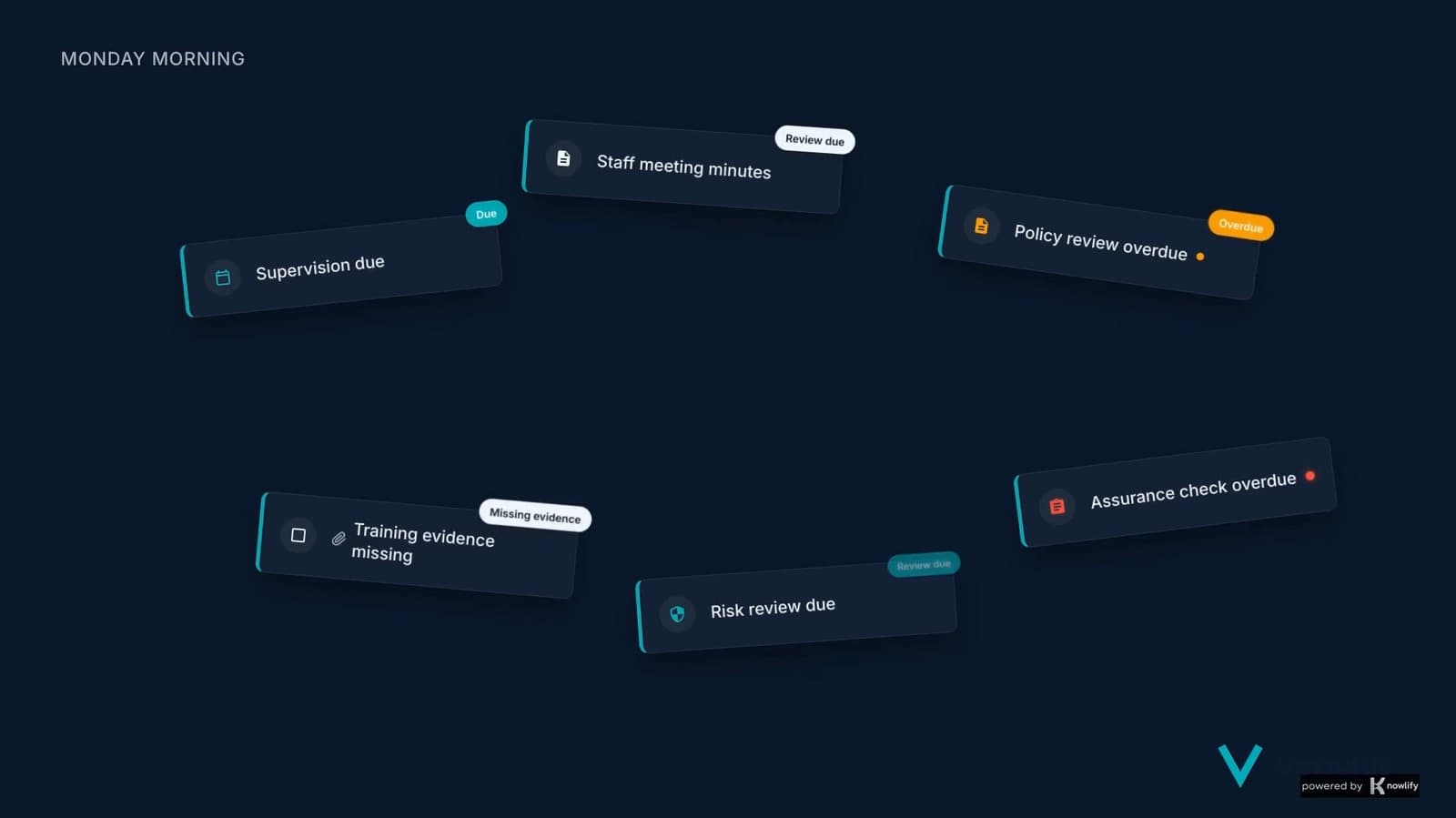
In a small regulated service, governance is not one meeting. It is the work that keeps coming back: a supervision is due, a staff meeting needs minutes, a policy review is overdue, training evidence is missing, a risk needs review, an assurance check has not been completed. Individually, each item looks small. Together, they decide whether the service is actually in control.
Verivius turns that scattered work into a live governance rhythm. The dashboard shows what needs doing now, what is overdue, and what needs evidence. Each task has an owner, a due date and a place to attach the record.
A supervision note can show a staff support theme. A staff meeting can produce an action. A document review can update the policy version. Training evidence can close a competency gap. A risk review can show whether the controls are working.
Then readiness is not guessed at the end of the month. It is checked from the work already completed. At the governance review, the registered manager can see the pattern: what was due, what was done, what is still open, and what needs escalation.
That is daily-use governance. Not a scramble before inspection. A service that knows what is outstanding, and what has changed.
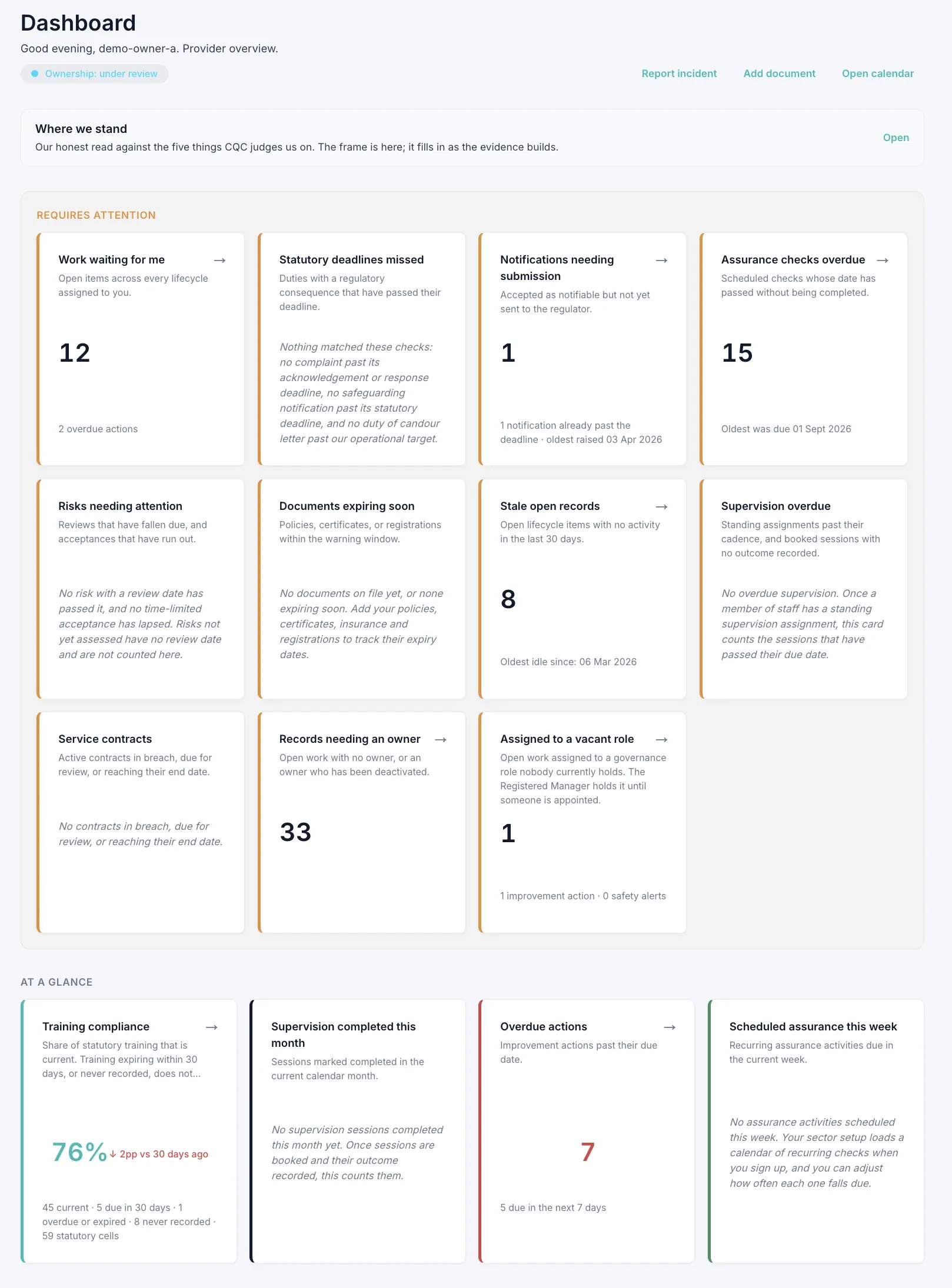 The workspace: navigation down the left, and the dashboard beside it.View the dashboard at full height
Requires attention
What has passed its date, or is about to. Overdue improvement actions, statutory notifications approaching their deadline, training certificates expiring inside seven days, any incident with the duty-of-candour clock running. Everything in this row carries a deadline, so it opens the dashboard rather than closing it.
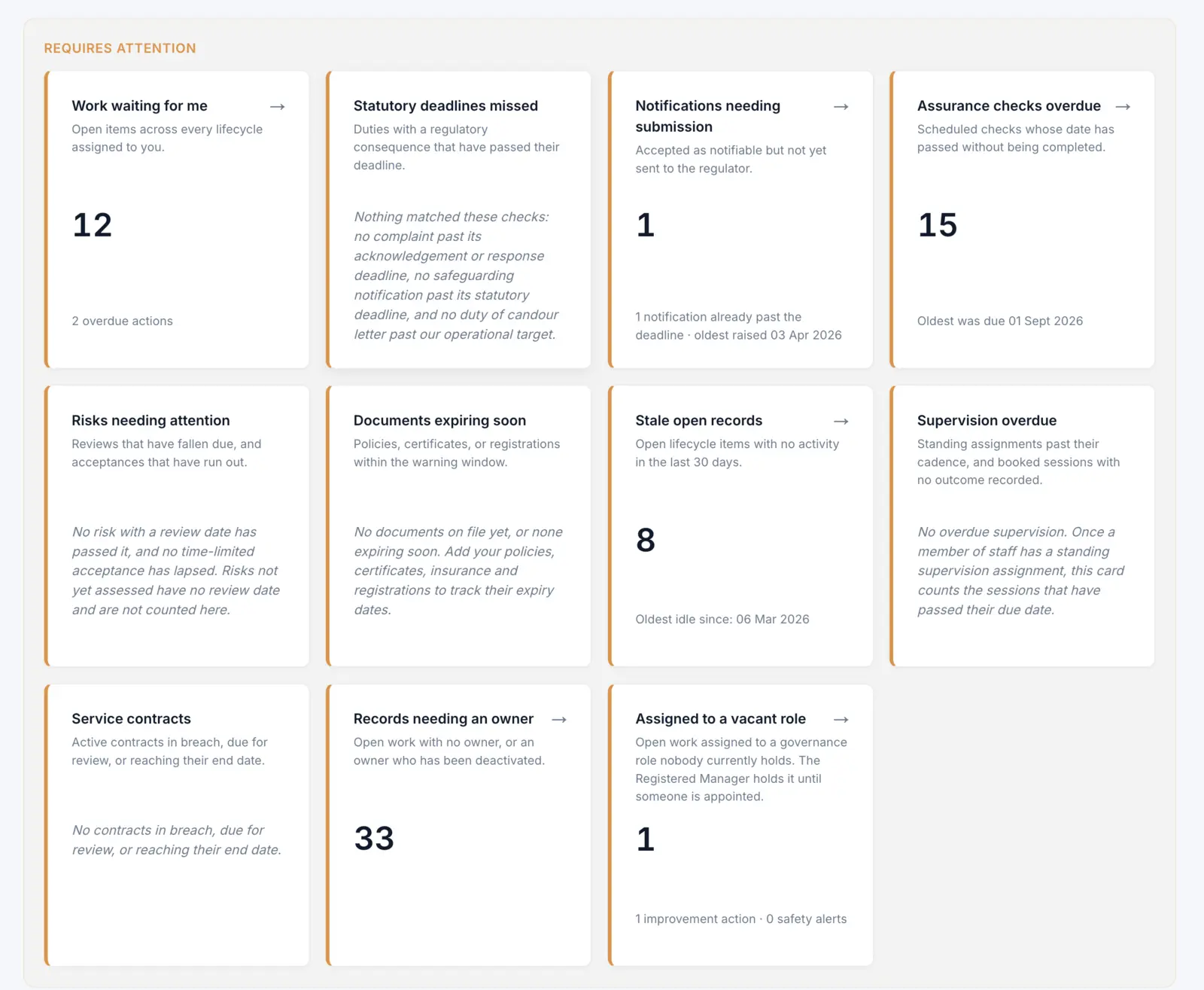 What needs your attention today. Verivius pulls deadlines, overdue assurance, unowned work and stale records from across the service into one operational view.View the whole attention row
At a glance
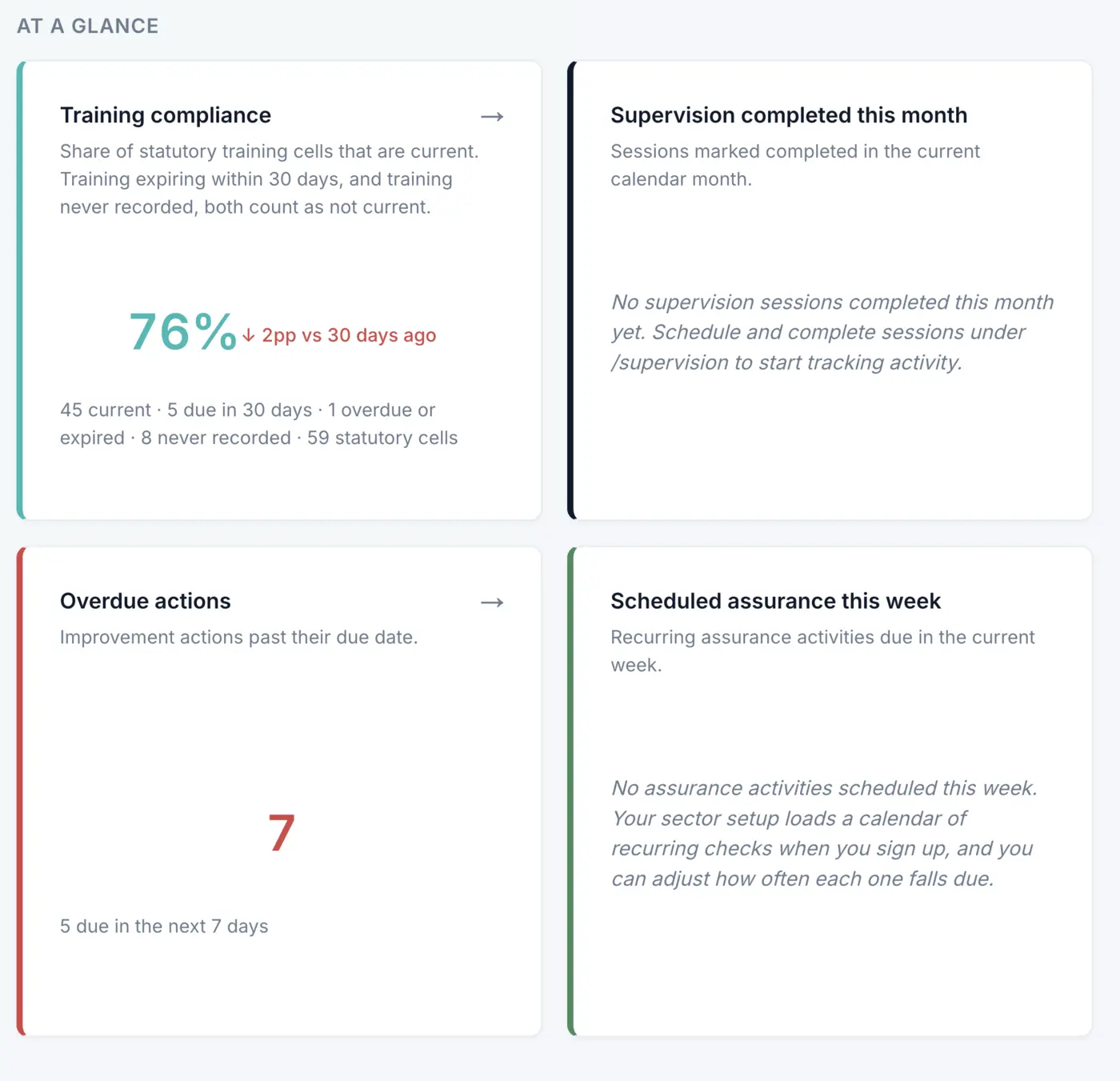
How the service is doing, as headline numbers rather than the records underneath them: training compliance, supervision completed this month, overdue actions, assurance scheduled this week. Each number is a link into the work behind it.
Operational
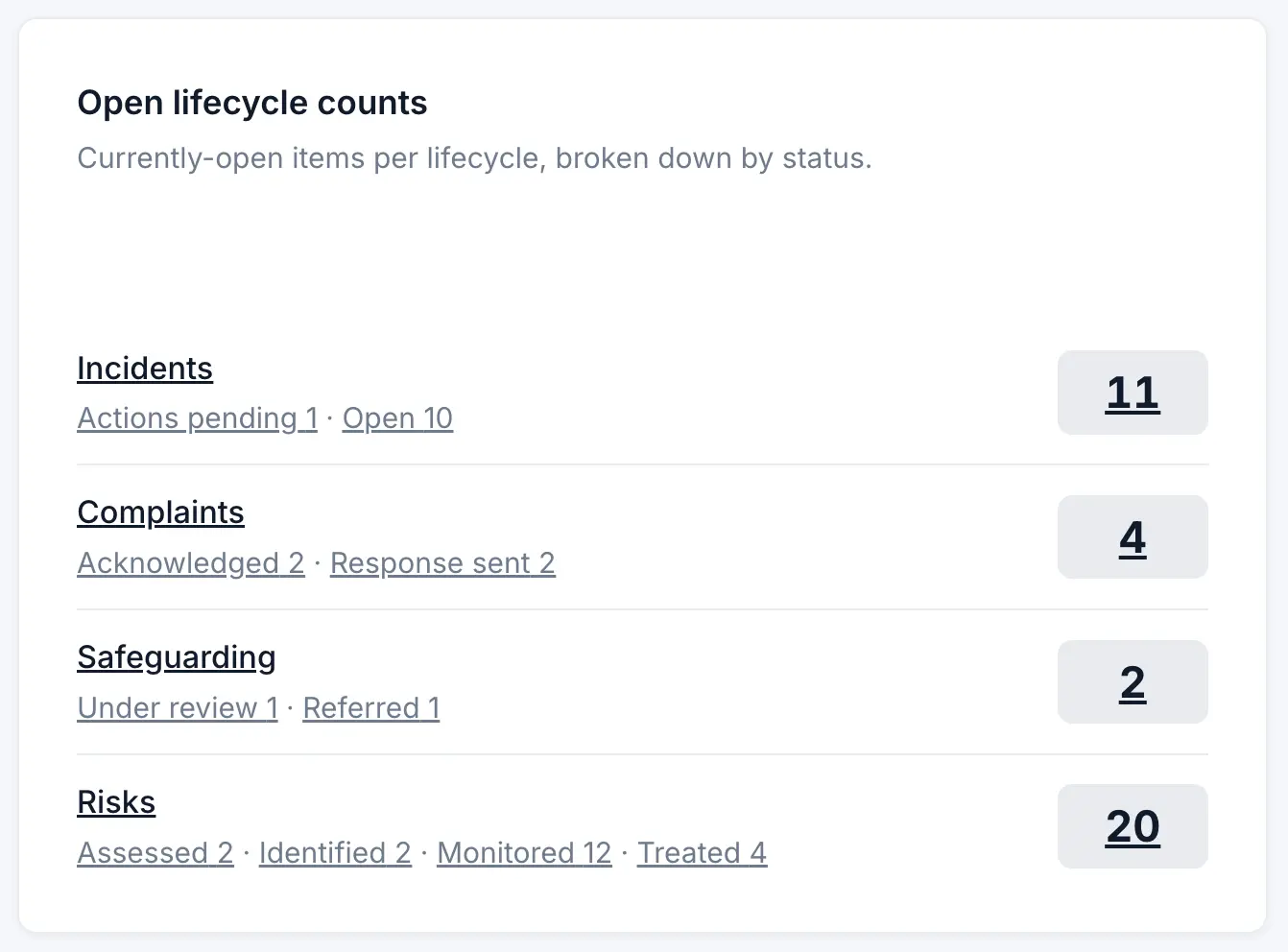
What is open right now, per lifecycle and per status, next to where each regulator notification sits. This is the row that answers “how much is in flight” without opening a single register.
Themes, on the Standard band
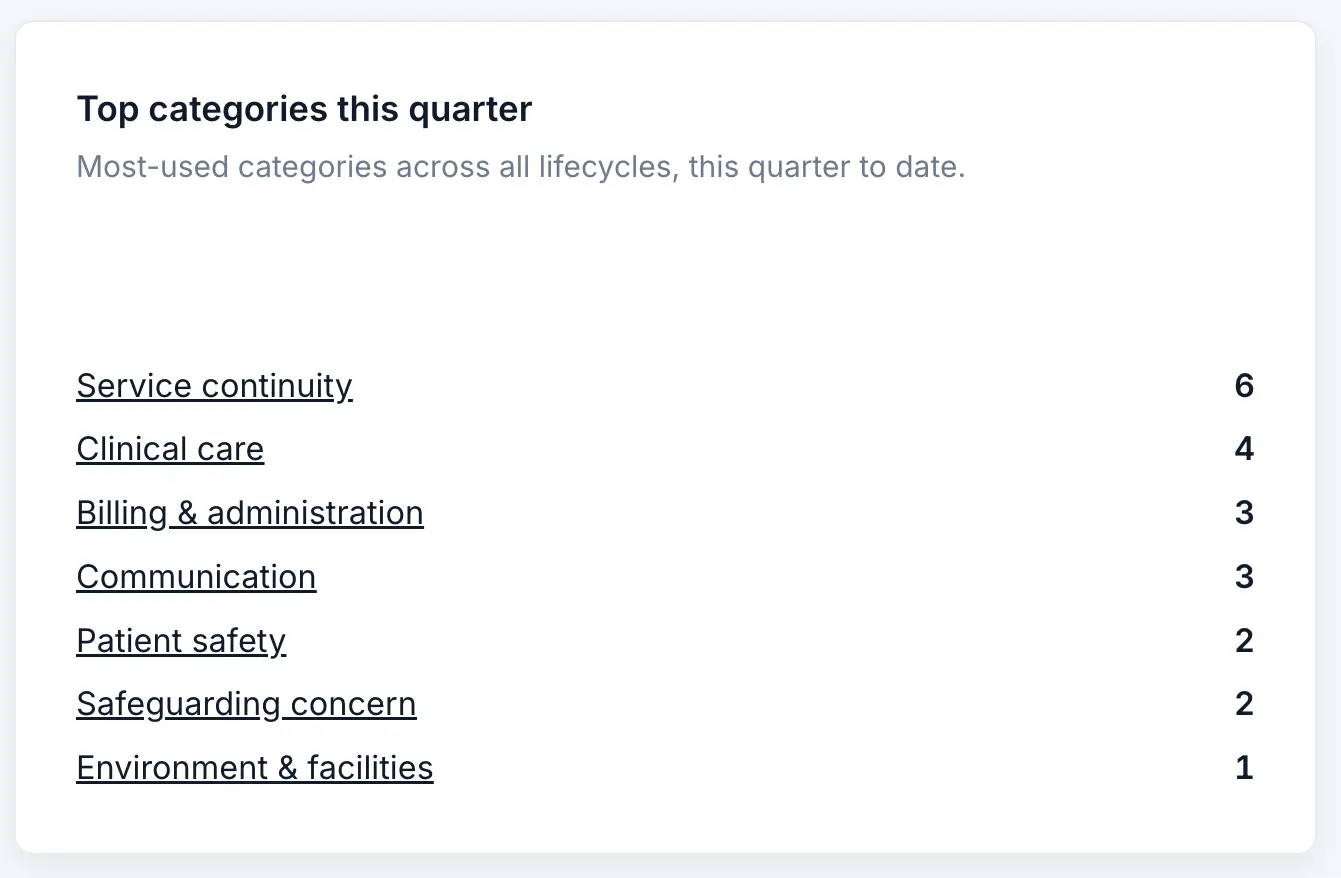
Categories pooled across every lifecycle and ranked for the quarter, so a theme running through incidents, complaints and risks is one list rather than three. Repeat-themed complaints, training gaps clustered on one role, risks above a 4×4 score on the NHS Matrix with no review this quarter. Small-band workspaces hide this row by design: one operator usually carries that picture in their head, and on screen it would add noise rather than signal.
Quick actions
Log an incident or near miss, log a complaint, log a safeguarding concern, add a document, open the calendar. The things done dozens of times a week sit on the dashboard, so nobody has to hunt for them. They are visible along the top of the workspace above.
Small-band workspaces see everything above except Themes. Standard-band workspaces see all of it. The band is picked at signup from staff size and operational shape, and the platform adapts to the answer.
3. The evidence loop in detail
Transcript
In thirteen years inspecting, I rarely found services with no records. The incident log was there. The complaints file was there. The risk register was there. The problem was the missing thread between them.
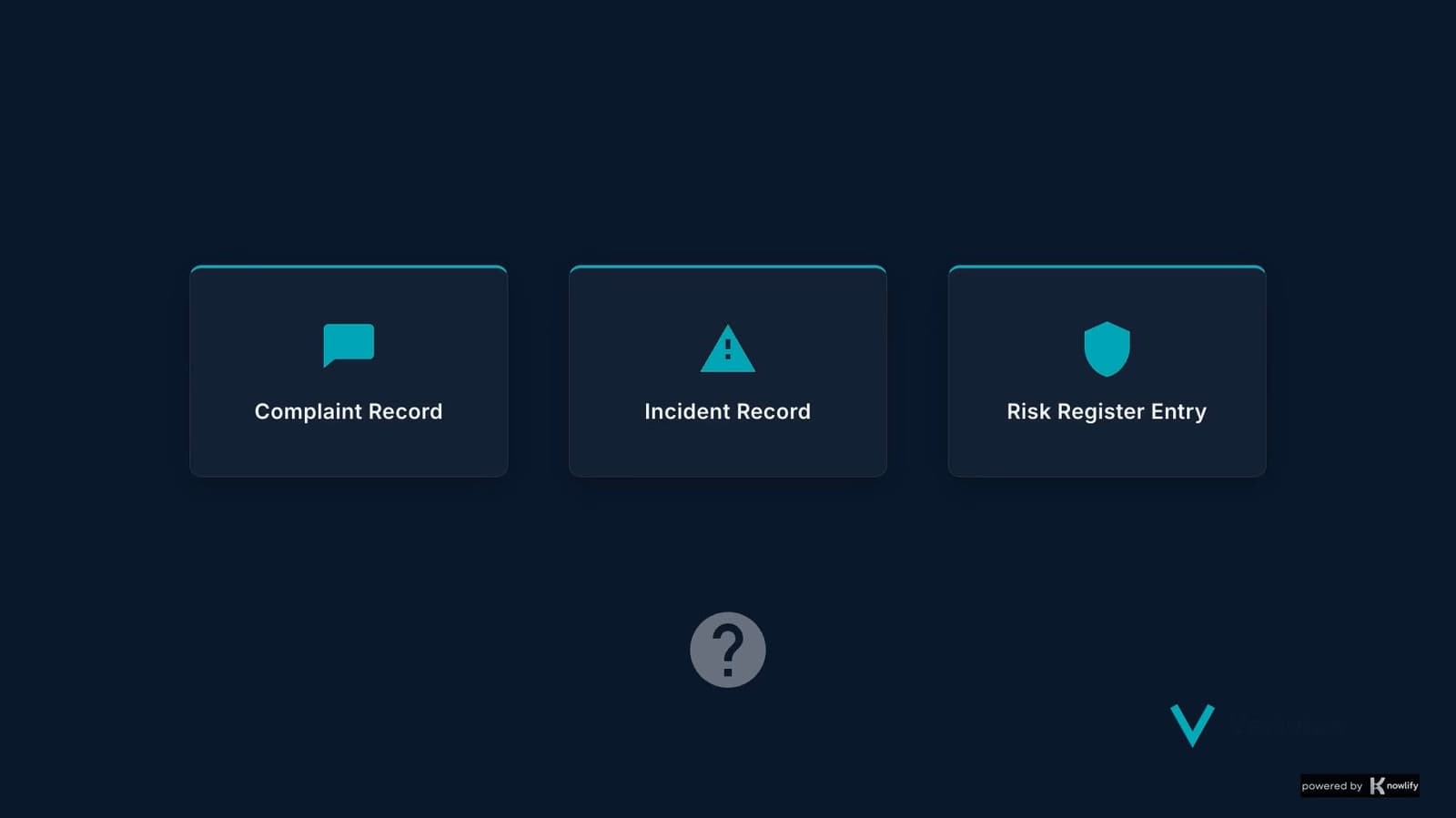
A complaint comes in: a missed dressing change has led to a wound getting worse. In a weak system, that complaint is answered and filed away. In Verivius, it becomes a connected evidence loop.
The complaint links to an incident. The incident prompts checks for candour, safeguarding and notification. Actions are assigned, with owners, dates and evidence. If the same issue has happened before, it updates the risk register. Training, policy review and senior cover changes are tracked through to the next governance review.
Nine connected records: complaint, incident, candour, safeguarding, CQC notification, actions, training, risk, governance. Eight evidence links between them. One closed loop. That is the difference between a service that manages events and one that learns from them.
The product's thesis is one sentence: a service that does the work well and keeps an evidence trail an inspector can verify will pass an inspection cleanly. The evidence loop is the mechanism that makes the second half of that sentence happen as a side effect of the first.
The loop has four stages. Every record in Verivius moves through it, whether the record is an incident, a complaint, a meeting minute, a training certificate, or an assurance check.
- Practice happens. A medication double check is missed. A patient complains about a follow-up call. A safeguarding concern surfaces. A nurse's BLS certificate is approaching renewal. These are the events of a normal working week.
- Evidence captured as a side effect. The practitioner closest to the event opens the relevant record (an incident, a complaint, a training entry, an assurance check), fills it in, saves. The capture step is two minutes, not twenty. It is the same friction as a paper logbook, only the record is structured, linked, and immediately available to anyone else who needs it.
- Continuous oversight surface. Captured records flow into the dashboard zones, the registers, the audit trail, and the monthly oversight report. The registered manager sees the picture without having to ask for it. Themes emerge across lifecycles; the next governance meeting has its agenda already half-written by what the platform surfaces.
- Inspection-ready by default. When an inspector asks to see "last quarter's significant events with closed action plans", the answer is one filter on the incidents register. When they ask "show me your decontamination audit log for the past six months", it is the assurance calendar. The work to be inspection-ready is the work you have already done.
This is what we mean by continuous governance. The traditional alternative is inspection prep: a six-week scramble before a known visit, during which paperwork gets retroactively tidied, policies get hastily reviewed, and the team spends evenings rebuilding minutes. Verivius replaces that with a loop that runs continuously and is ready when the visit lands, announced or not.
4. The lifecycles you actually use
Each lifecycle is a structured record type with its own register, detail page, event stream, and reporting surface. They share a common shape: an open state, captured detail, a closure with documented learning, and an audit row for every change along the way.
Incidents
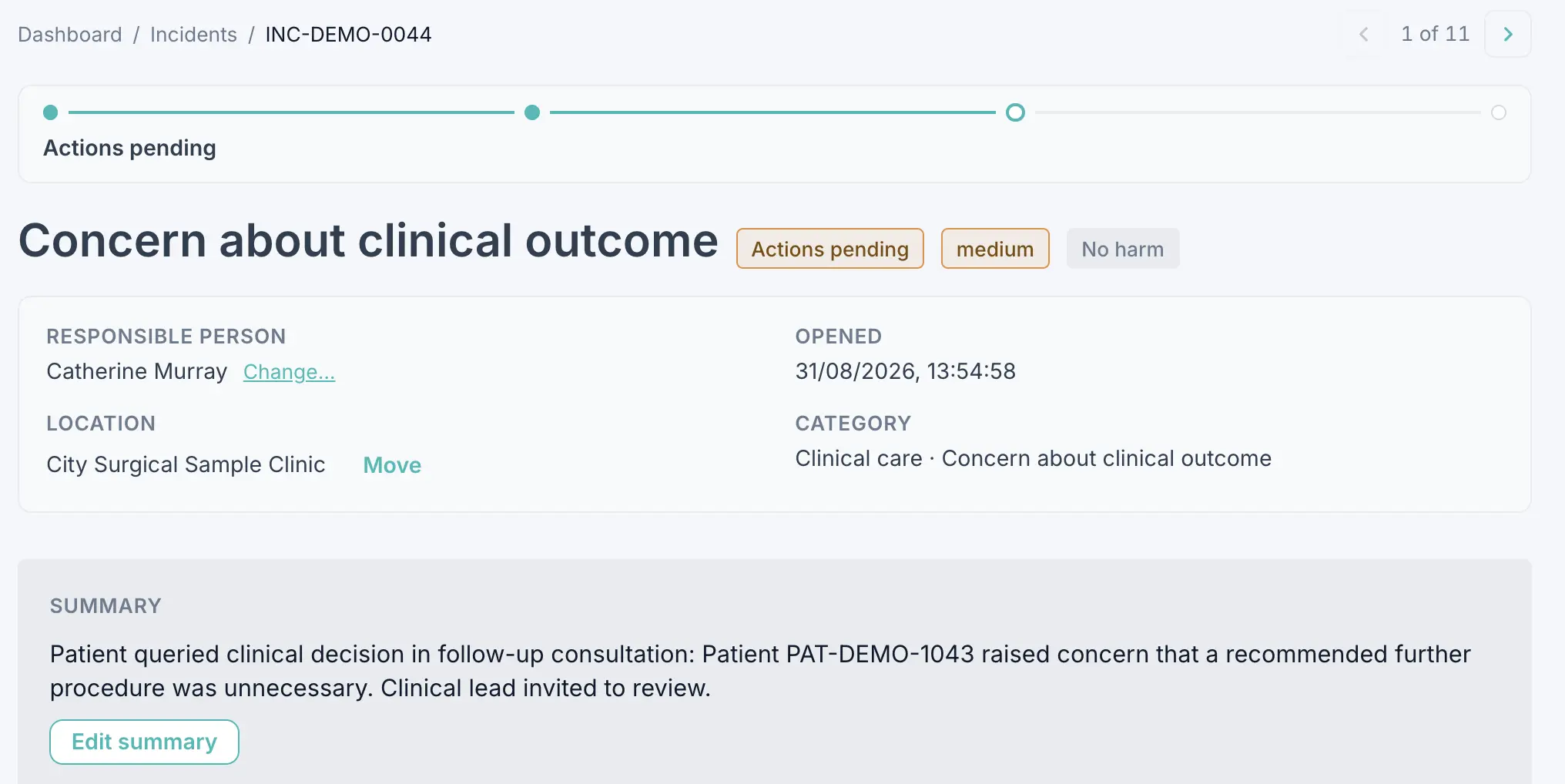
Patient safety incidents, near misses, clinical errors, medication issues, equipment failures. Each incident opens with a severity, a category, and a description; accumulates investigation notes and immediate actions; closes with a documented learning point and any improvement actions assigned. The framework panel on each incident surfaces which CQC notifications, duty-of-candour duties, and Reporting of Injuries, Diseases and Dangerous Occurrences Regulations (RIDDOR) triggers may apply based on category and harm level.
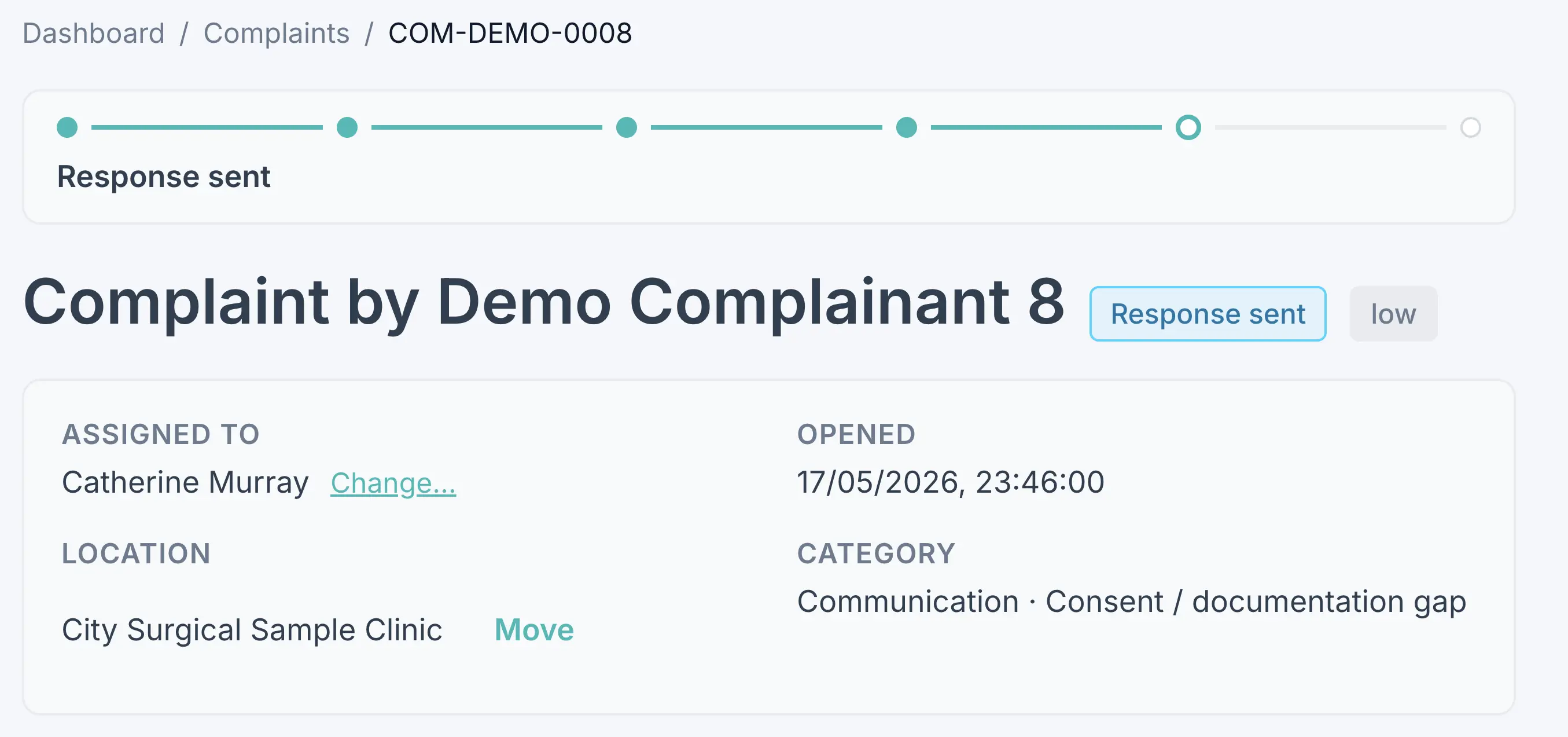
Complaints
Patient and family complaints by any channel. Tracks acknowledgment within policy, investigation, written response, and themes for governance review. The framework panel surfaces the NHS Complaints Regulations 2009 deadlines for NHS-contracted services and the provider's own policy defaults otherwise.
Safeguarding concerns
Adult and child safeguarding concerns with the local authority referral pathway, Multi-Agency Safeguarding Hub (MASH) liaison, and supervision trail. Categories adapted per sector (e.g., the dental sector setup includes child dental neglect; the private clinic setup includes under-18 cosmetic procedure prohibition).
Risk register
Active risks scored on the NHS Matrix (likelihood × impact, 5×5 grid). Each risk has a mitigation owner, a current control set, a review cadence, and an audit trail of every score change. Zone 3 surfaces high-scoring risks without a recent review. See the risk register software.
Safety alerts
Central Alerting System (CAS) alerts, Medicines and Healthcare products Regulatory Agency (MHRA) Yellow Card alerts, manufacturer field-safety notices. Tracked from receipt through assessment to documented action (or documented non-applicability), so the inspector can see why each alert was or was not actioned.
Statutory notifications
Notifications to CQC under Regulations 16, 17 and 18. Captures the trigger event, the notification text lodged, the recipient confirmation, and the link back to the originating record. The framework panel uses verbatim regulatory wording with citations – we never paraphrase a statutory deadline.
Governance meetings
Monthly clinical governance, quarterly safeguarding, quarterly infection control, annual review. Each meeting has an agenda template (sector-aware), captured minutes, and an action log with named owners and due dates. Actions roll across meetings until closed; the aged-action surface is what inspectors look for when they sample governance evidence.
Training matrix
Every staff member, every required competency, current status, expiry date. Renewal alerts fire at 60 days before expiry. Sector-specific competencies layer on top of the generic healthcare set (BLS, IPC, safeguarding levels 1-3, fire, manual handling, information governance, MCA, consent). The training gap a quarterly Disclosure and Barring Service (DBS) audit identifies is the same gap the inspector samples for.
Staff supervision
Documented one-to-one supervision per staff member, with cadence per role and the topics covered. The evidence inspectors look for when they ask "how do you support your team to do this work safely".
Assurance calendar
Recurring assurance items seeded from your sector pack: weekly fire walkround, weekly resuscitation equipment check, monthly emergency drug expiry check, monthly incident log review, quarterly DBS audit, quarterly safeguarding leads meeting, annual equipment QA, annual DPIA review. Each occurrence schedules itself, gets assigned to the right governance role, and is marked complete with evidence attached. The calendar is the platform's heartbeat.
Readiness reviews
The surface where Mock Inspections live. Each review captures the five CQC key questions, the Quality Statements assessed, the evidence cited, the findings, and the action plan with completion tracking. A readiness review is the structured output of a Mock Inspection engagement; in routine use it is also the place a service self-assesses ahead of an expected visit. See how inspection readiness works.
5. The audit trail
Transcript
Every governance record tells a story of change. Verivius captures the full audit trail behind it. Each update is logged with the actor, timestamp, action taken, and the before and after state.
Need to know who closed an action, when a risk score changed, or whether evidence was attached before closure? The audit trail answers it, clearly and traceably.
And when Verivius Support accesses a customer workspace, that access is visible too.
Verivius. Daily-use governance for CQC providers.
Every write to every record in Verivius produces an audit row. Who edited, what they edited, when, and the before and after values. The trail is captured by a database trigger that runs on every change, so it is not something a developer or a user can switch off mid-write.
Owners and administrators find the log in Settings, under Audit log. You can filter it by date range, by the person who made the change, and by the kind of record that was touched, then sort by when it happened or by the kind of record. Every row names the change in plain English and lists each field that moved, with the raw before and after values a click away. When an inspector says "who closed this incident on the 12th?", the answer is in the audit log in seconds.
6. The monthly oversight email
On the first day of each month, weekend or not, Verivius builds the monthly oversight report for the workspace and emails it to the registered manager and the nominated individual, falling back to the owner where those roles are not filled. Every report is filed in the workspace as evidence and listed on screen under Monthly oversight reports. It is the system looking at your service and telling you what it saw.
What goes in it: a plain-English account of the month, covering what went well, what needs attention, what is coming up, and where your goals stand. Behind the account sits the scorecard it is written from. Records logged, incidents opened and closed, overdue items, complaints opened and complaints past their response deadline, safeguarding deadlines missed, and risks still open, with the rest of the month underneath: assurance, training, supervision, improvement actions, safety alerts and the governance meetings held. The written account is built from those same figures to a fixed template, so the same month's data always produces the same words.
A second email follows the same morning: the monthly governance summary, which reports filing posture rather than activity. Notifications filed on time, notifications whose deadline passed without a filing, and open improvement actions grouped by how close they are to their due date. You choose who receives it in Settings, under Email preferences. Anyone added from outside the workspace confirms by clicking a link before the first send and can unsubscribe from any message; people on the workspace are added and removed from that same screen. On the larger-provider tier the summary carries more: the next fortnight of notification deadlines grouped by framework, open actions by who owns them, assurance checks completed with no evidence attached, and responsible-person roles nobody holds.
These emails are the proof-of-life signal that the platform does work on its own without prompting. The first one to land in a new account is one of the platform's activation milestones.
7. Mock Inspection, as a workflow
Mock Inspection is a separate commercial engagement (£3,500 per location, eight to ten working days of consultant time across a four to six week window, written report, three-month follow-up). The product surface for it is the readiness review lifecycle described above. A Mock Inspection is a structured authoring of a readiness review by an ex-CQC inspector working as a Verivius consultant.
The workflow from your side:
- Scoping. An initial call with Klaudiusz to agree the location, the dates, the focus areas (if any), and the scoping documents he needs in advance.
- Fieldwork. Eight to ten working days on site or remote (your call) sampling records, interviewing the registered manager and key staff, walking the premises if on site, observing handover and other team-meeting touch points.
- Drafting. The readiness review is authored within the platform. You see the draft as it is built, including evidence citations against your own records.
- Factual correction. You have a week to flag any factual inaccuracies before the report is delivered. Findings are not negotiated; factual accuracy is.
- Delivered. The final report, the action plan in the platform with assigned owners and due dates, and the three-month follow-up commitment.
A Mock Inspection produces a permanent record in your account. The findings live in the platform; the action plan lives in the platform; the follow-up at three months checks the action plan against current evidence. None of this is a static PDF that gets emailed and filed away.
Mock Inspection in full covers the commercial side: bands, refund policy, what changes if you are also a Verivius Design Partner.
8. Week 1, week 4, month 6
What the platform looks like at three anchor points after you sign up. The shape evolves; the work compounds.
Week 1
You have signed up, picked your tier, verified ownership, and run through the five-step setup wizard. The assurance calendar is pre-loaded with the items for your sector. The training matrix, where enabled, has the competencies for the roles you set up. The dashboard is mostly empty but shows you what the empty surface will fill with. By the end of week 1 you should have logged at least one real incident, complaint, or safeguarding concern. That is the activation milestone.
Week 4
A month in, the dashboard is no longer empty. You have a handful of incidents and complaints with their event streams, a couple of assurance occurrences completed with evidence attached, a first governance meeting logged with its action list. Training matrix shows compliance percentage with renewal alerts firing for anything approaching expiry. The first monthly oversight report arrives at the start of the next month. You can see what the platform does on its own.
Month 6
Now you have six months of records. Zone 3 surfaces themes across lifecycles. Assurance calendar completion rate has a trend you can quote in governance meetings. Risk register has aged risks with review notes attached. Audit log can answer almost any inspector question about who-did-what within the period. The monthly oversight report is a quarterly meeting's worth of substance, every month. If a CQC inspection landed at month six, the answer to most evidence questions is one filter on a register away.
9. What Verivius is not
The other half of being clear about what we do is being clear about what we do not. Five negative commitments that propagate through the product as well as the brand.
- Verivius does not guarantee a CQC rating. No software does. We get the evidence trail in order; the rating depends on the underlying practice the trail describes. Any vendor promising otherwise is overselling.
- Verivius does not paraphrase regulation. When the platform surfaces a statutory wording, deadline, or duty, it reproduces the regulator's text verbatim with citation. Paraphrased regulatory wording is wrong wording.
- A Verivius consultant is not a CQC inspector. They may have been (Klaudiusz was, for thirteen years), but they are not now. The consultant's job is to help you read the evidence the way an inspector would.
- Verivius does not replace clinical judgment. No system decides whether a procedure is appropriate, writes a consent conversation, or makes a treatment call. The clinician owns those decisions; the software records the trail of them.
- Verivius does not sell to providers we cannot serve. If our discovery call reveals you are the wrong fit (an NHS trust, an EMR-shaped need, a compliance requirement we do not meet), we say so. Half of discovery calls should end with "Verivius is not what you need yet".
Read the full statement at About / What we will not do.
See this in your own service
A 30-minute call is the fastest way to see the platform for the shape of your service. No pitch deck, no slide-led discovery questionnaire. Klaudiusz logs into the demo workspace, walks you through it, answers what you actually want answered.
Prefer to read first? The year-one case study follows a single-location surgical clinic through 12 months of using Verivius, and the sector pages describe the per-sector evidence categories Verivius preloads into a fresh workspace.
Common questions: see the Day-to-day use section of the FAQ.
Free for 14 days from when we verify your account, with no card needed to start.
Last reviewed 30 May 2026